



我们在工作中可能会遇到内网服务器通过外网IP调用本地服务,而网络不可达的问题,如图示:
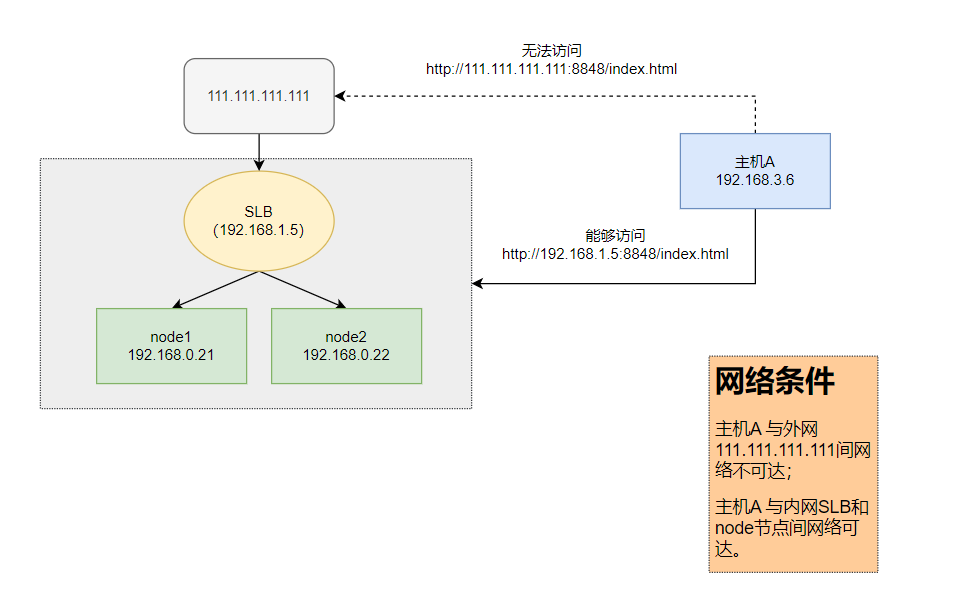
需求:我们希望 主机A 内的应用程序能够直接以 http://111.111.111.111:8848/index.html 访问服务,则需要在 主机A 上设置iptables规则,以更改数据包的目的IP。
解决方案:
- 应用程序没有使用容器,直接运行在 主机A 中
这种情况理解最为简单,应用程序的对外访问请求为主机A的出站流量,在iptables nat表的OUTPUT链中使用dnat方法更改数据包的目的IP
在 主机A 执行:
iptables -t nat -A OUTPUT -d 111.111.111.111 -p tcp --dport 8848 -j DNAT --to-destination 192.168.1.5:8848 - 应用程序运行在主机A中的容器中
这种情况需要特殊对待,因容器与宿主机(主机A)之间的网络是隔离的,对于容器来说,主机A是路由器的角色。容器(应用程序)对外访问流量需要先进入主机A,再由主机A转发出去,所以此时需要在iptables nat表的PREROUTING链中使用dnat方法更改数据包的目的IP
在 主机A 执行:
iptables -t nat -A PREROUTING -d 111.111.111.111 -p tcp --dport 8848 -j DNAT --to-destination 192.168.1.5:8848
添加开机执行:
视情况,可以选择将上述语句放入开机执行脚本 /etc/rc.local中:
#!/bin/bash
# THIS FILE IS ADDED FOR COMPATIBILITY PURPOSES
#
# It is highly advisable to create own systemd services or udev rules
# to run scripts during boot instead of using this file.
#
# In contrast to previous versions due to parallel execution during boot
# this script will NOT be run after all other services.
#
# Please note that you must run 'chmod +x /etc/rc.d/rc.local' to ensure
# that this script will be executed during boot.

touch /var/lock/subsys/local

iptables -t nat -A OUTPUT -d 111.111.111.111 -p tcp --dport 8848 -j DNAT --to-destination 192.168.1.5:8848
需要注意的是,在 CentOS 7 中,这是个链接文件
# ls -l /etc/rc.local
lrwxrwxrwx. 1 root root 13 Jan 28 04:07 /etc/rc.local -> rc.d/rc.local
而目标文件默认没有可执行权限
# ls -l /etc/rc.d/rc.local
-rw-r--r--. 1 root root 581 Feb 25 02:38 /etc/rc.d/rc.local
需要赋予可执行权限才能使之生效
# chmod a+x /etc/rc.d/rc.local
# ls -l /etc/rc.d/rc.local
-rwxr-xr-x. 1 root root 581 Feb 25 02:38 /etc/rc.d/rc.local
评论区